The most accurate and secure bank statement converter

Bank Statement Converter

Convert bank statements to Excel (XLSX) or CSV using AI

PDF, JPG, PNG, BMP, HEIC, TIFF

Upload your bank statement

Click to upload a single file

PDF, JPG, PNG, BMP, HEIC, TIFF

Uploading...

Accurate bank statement converter

From PDF to Excel in minutes

Automatically convert bank statements to structured columns (date, description, debit/credit, running balance) for faster reconciliation and analysis — no manual data entry.

BankXLSX Application Dashboard

Convert bank statements to clean spreadsheets in minutes — no manual data entry.

How our bank statement converter works

Upload a statement, we parse it with AI, and you download a clean spreadsheet.

Step one: upload PDFs or images directly from your desktop or cloud drive. Our OCR bank statement converter detects multi‑page files, poor scan quality, and rotated pages, then normalizes everything for reliable extraction.

Step two: AI models trained on thousands of layouts convert bank statements to Excel with consistent columns — perfect for reconciliation, audit support, and transaction analysis.

Step three: export your bank statement to CSV or XLSX and import into QuickBooks, Xero, NetSuite, or spreadsheets. Use bulk conversion to process monthly statements faster and keep your general ledger up to date.

1. Upload

PDF or image statements from any bank. Bulk uploads supported.

2. Convert

AI parses bank statements to capture date, description, debit/credit, running balance and more.

3. Export

Download to Excel or CSV, or push to your accounting system.

Security & privacy for your bank statement converter

Enterprise‑grade protections by default. Your statements are encrypted, access‑controlled, and processed with strict privacy in mind.

When converting bank statements to Excel or CSV, data security matters. Our platform uses secure connections during upload and download, short‑lived processing, and strict access controls to keep sensitive financial information private.

Teams choose BankXLSX when they need a compliant bank statement converter for bookkeeping, audits, loan underwriting, and expense analysis — without sending data to unreliable tools.

If you are searching for a “secure bank statement converter” or “privacy‑focused bank statement to CSV tool”, our workflow is built to meet those requirements.

Encryption everywhere

TLS 1.2+ in transit and AES‑256 at rest for all files and results.

Access controls

Granular role‑based permissions and audit trails for every action.

Privacy by default

Data minimization, short‑lived processing, and optional zero‑retention.

Compliance ready

Support for SSO/SAML, DPAs, BAAs, and regional data residency (Enterprise).

Why choose our bank statement converter

Accuracy comes first. Unlike generic PDF tools, our bank statement converter is trained to recognize banking terminology, transaction lines, running balances, and layout quirks across institutions. This means fewer corrections and faster close.

Finance teams rely on our solution as a QuickBooks bank statement converter, a Xero bank statement importer, and an Excel‑ready CSV generator. If you are migrating systems, preparing audits, or reconciling historical statements, batch conversion saves hours every week.

Popular use cases include “convert bank statement PDF to CSV for QuickBooks”, “bank statement converter for expense tracking”, and “export bank statement to Excel for reconciliation”.

Our bank statement converter helps accountants, bookkeepers, and finance teams turn PDF bank statements into clean spreadsheets in seconds. Avoid manual typing and copy‑paste errors with automated parsing that recognizes dates, descriptions, debits/credits, balances, and currencies.

Whether you need a QuickBooks bank statement converter, a Xero‑ready bank statement to CSV exporter, or a bulk bank statement OCR converter for monthly reconciliations, BankXLSX delivers accurate column mapping for fast imports.

Common requests we support include “convert PDF bank statement to Excel”, “bank statement to CSV online”, “OCR bank statement converter for scanned statements”, and “multi‑page bank statement converter for complex layouts”.

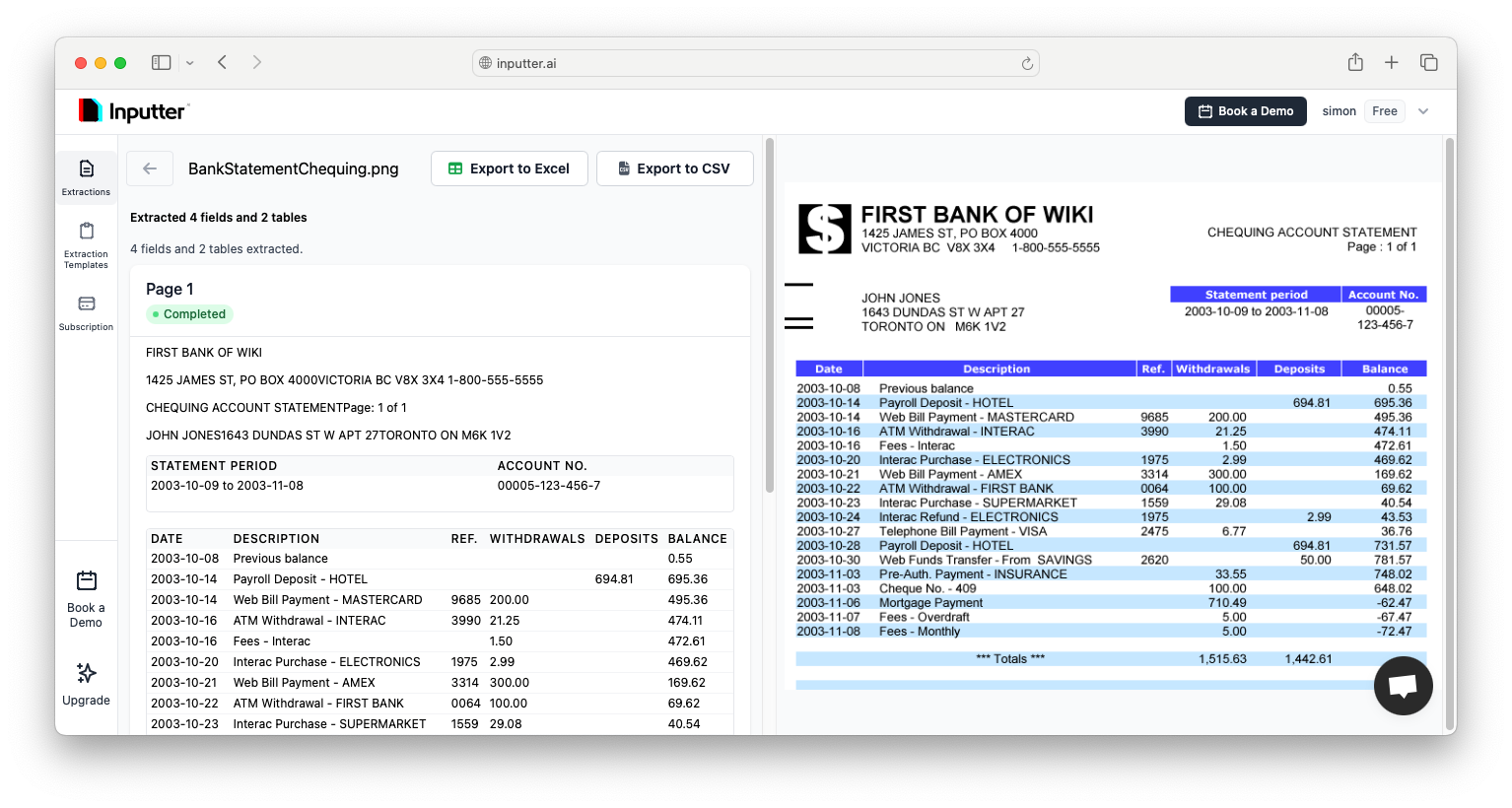
Who uses our bank statement converter
  • Accountants & bookkeepers
  • Finance & operations teams
  • Auditors & compliance
  • Lenders & underwriting
Quick highlights
  • Handles scanned & multi‑page PDFs
  • Consistent columns for imports (date, description, debit/credit, balance)
  • Bulk conversion for monthly statements
Most accurate parsing

Purpose-built models handle noisy scans, multi-page statements and complex layouts.

Ready for reconciliation

Clean columns (date, description, amount, balance, currency) mapped consistently.

Secure by design

Encrypted in transit and at rest. Optional zero data retention for Enterprise.

Bank statement converter FAQs

Answers to common questions about converting bank statements to Excel or CSV.

What is a bank statement converter?

A bank statement converter transforms PDF or image statements into structured spreadsheets (XLSX/CSV) so you can reconcile faster with clean columns like date, description, debit/credit, and running balance.

Which formats do you export to?

You can download results as Excel (XLSX) or CSV. Bulk exports are supported for faster processing.

Does it work with scanned PDFs?

Yes. The converter is built to handle scanned and multi‑page statements, noisy images, and varying layouts from different banks.

Is my data secure?

Files are transferred over secure connections and stored safely. You can delete your data at any time.

Security & privacy for bank statement conversion

We take security seriously. Your files are transferred over secure connections and stored safely. You can delete your data at any time.

Our bank statement converter is designed for teams handling confidential financial data. Access is limited to your account, processing is short‑lived, and you stay in control of retention.

If you need a privacy‑first bank statement to CSV solution or a compliant bank statement to Excel workflow for reviews and audits, BankXLSX provides a dependable foundation.

  • Secure connections
  • Private to your account
  • Delete data anytime

Trusted bank statement converter for finance teams

client 1
client 2
client 3
client 4
client 6

What customers say about our bank statement converter

Real users share their experience with BankXLSX

Customer testimonial

"BankXLSX cut our statement processing time by 80% and eliminated manual cleanup."

Mark S.

Lead Product Manager at TenantBase

Customer testimonial

"From cluttered PDFs to clean spreadsheets in minutes. It’s become part of our daily workflow."

Jennifer L.

Operations Director at GlobalFreight Logistics

Bank statement converter resources